ENHANCING THE PRODUCER EXPERIENCE
Your Path
to Yes
Starts Here

Reimagined Experiences to Power Your Growth
The Path to Yes is a commitment to our partners: when you trust us with quality risks, we find the “yes” to take them from blocked to bound and from renewed to retained. No dead ends. No lost momentum. We are here to clear the way forward.
Find the concrete, functional improvements we are making to remove blockers, increase responsiveness and transparency, and give you control of how you show up for your clients.
More Sales
Velocity
Capture high-quality risks at the speed of the market with competitive products, specialized solutions, and broader eligibility.
More Post-Bind Confidence
New tools offer clearer, more consistent information to support smoother post‑bind experiences.
Competitive
Renewals
Add value for your clients, reinforce your advisory role, and keep more business with renewal tools that set you up for success.
Expert
Advocacy
Get the strategic partnership and responsive service that protects your reputation & enables your growth.
Milestones on the Path to Yes
July 2025
Dedicated Service with the Producer Advocacy Team
Your champion for post-bind solutions helps find the “yes” for strong business.
October 2025
Zero-Guesswork Roof Geometry Prefill
Auto-populated roof geometry in the quote ensures accuracy.
DECEMBER 2025
Regional Underwriting for Consistent Decisions
Every underwriting decision is informed by regional realities.
JANUARY 2026
Roof Age Verification to Reduce Post-Bind Shifts
Third-party at-bind verification ensures a strong underwriting fit.
Easy & Accurate Drone Assessments
High-quality drone images expedite underwriting evaluations.
February 2026
Fast Roof Replacements with RoofMarketplace
Connect clients with vetted roof contractors to replace old roofs and keep policies in place.
March 2026
Competitive Renewal Offer Alternatives
Instantly compare renewal offer alternatives optimized for savings—all within Agent Portal.
JULY 2026
Enhanced Post-Inspection Experience
Clearer guidance, producer preview, real-time tracking, and faster responses make post-inspection easier to navigate and resolve.
COMING SOON
More Enhancements in the Works
Stay tuned for more details.
TRANSFORMING INSPECTIONS
An Advisory-Led Post-Inspection Experience
The new post-inspection experience emphasizes your advisory role and keeps the focus on what matters most: safeguarding your client’s property.
Our reimagined experience delivers the clarity, transparency, and data you need to guide clients through important property improvements and secure their coverage. Inspection results are displayed the same in Agent Portal as they will be in your client’s SageSure account, ensuring you have all the information you need to walk them through next steps.
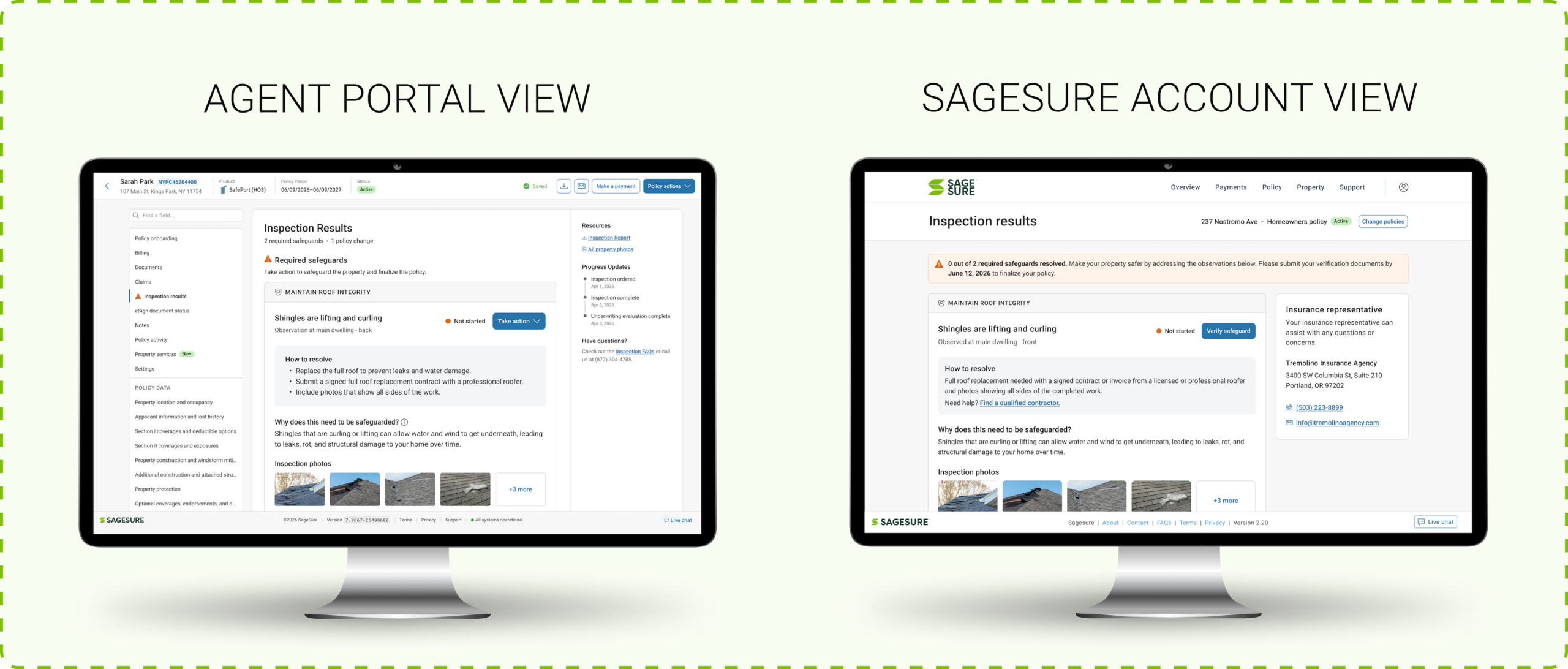
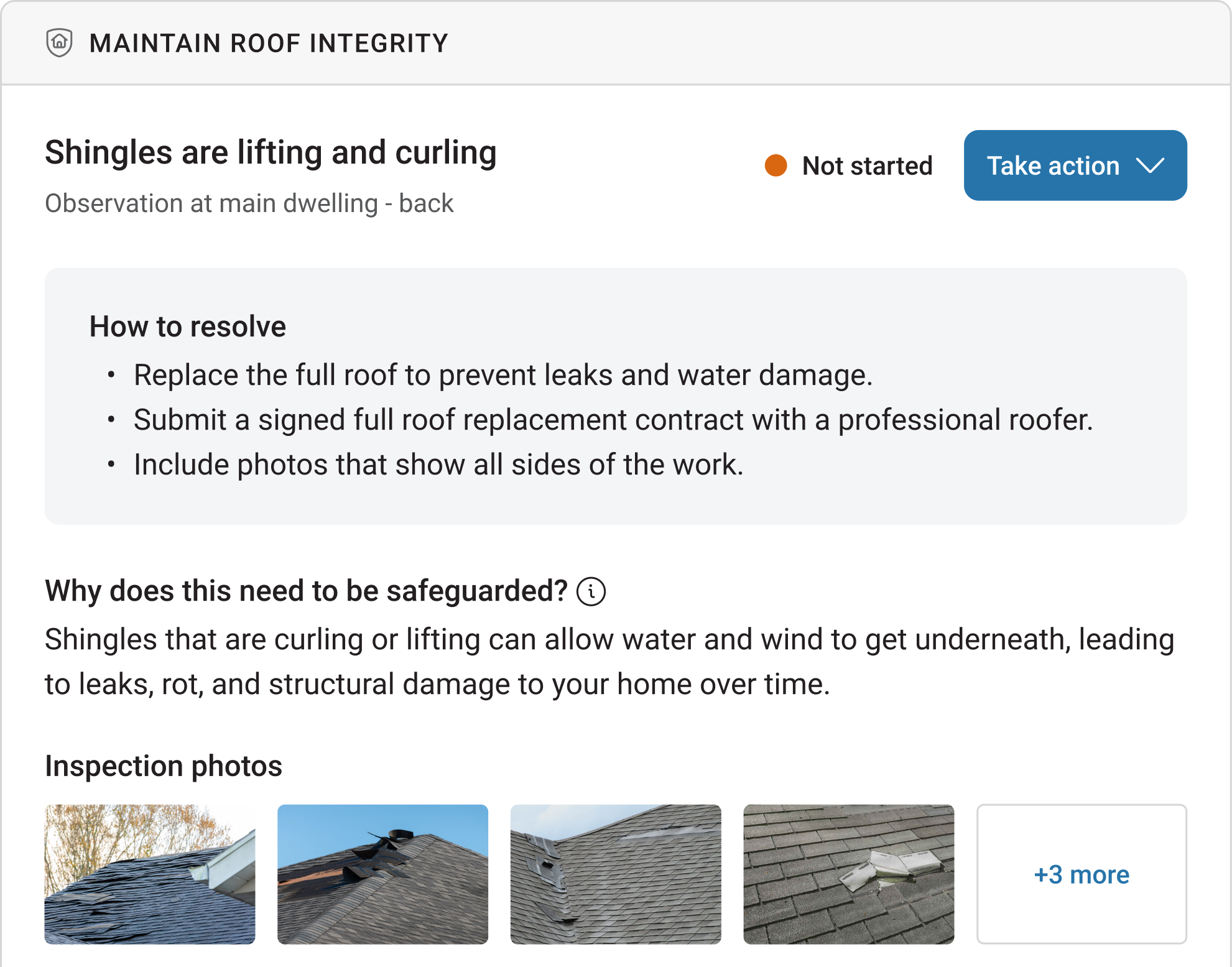
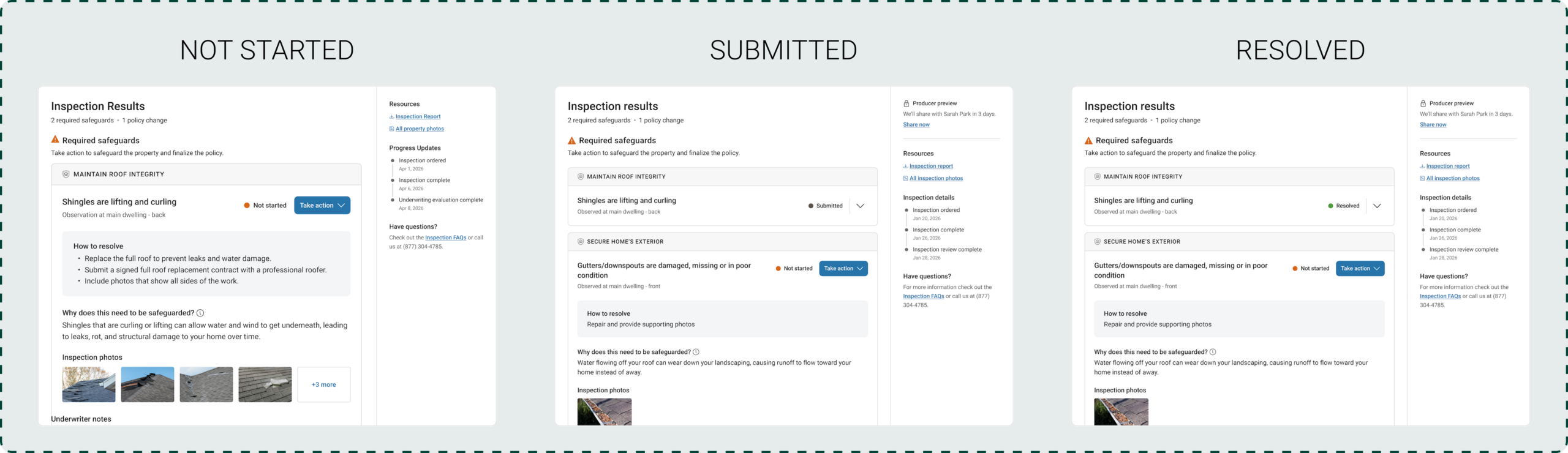
Make inspections an advisory opportunity that reinforces your expertise and protects your book. When a property requires attention, it appears as an objective required safeguard. Each one is anchored to a clear protection goal (e.g., Maintain Roof Integrity). The platform automatically provides the precise “how” and “why” behind every inspection observation, arming you with a value-focused narrative to help clients resolve requirements and maintain their policies.
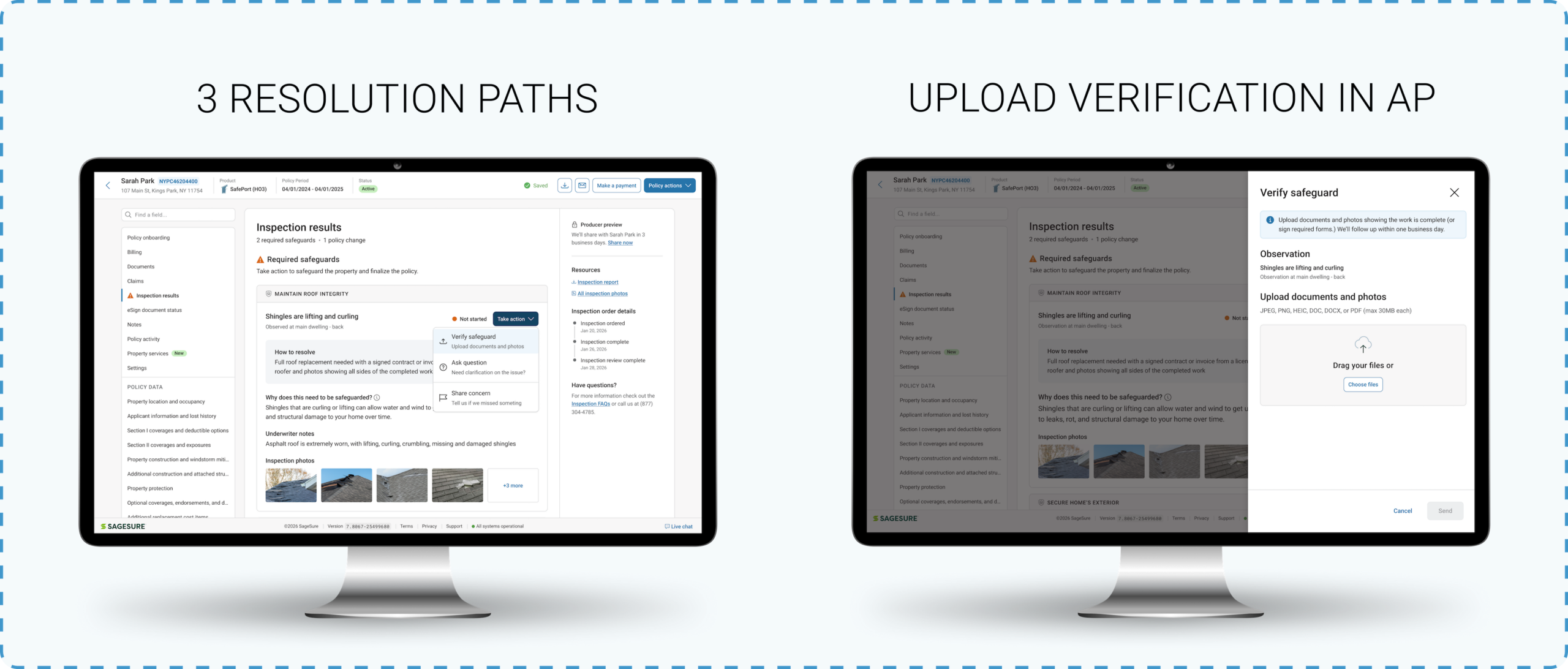
You now have three ways to take action for any required safeguard: Verify the Safeguard, Ask a Question, or Share a Concern. Any path comes with a committed one business-day SLA for the initial response.
With the new upload feature, you can submit verification documents directly in Agent Portal when work is complete. Whether you upload documentation or your client does, the change will be reflected in both your accounts, saving your agency valuable administrative time.
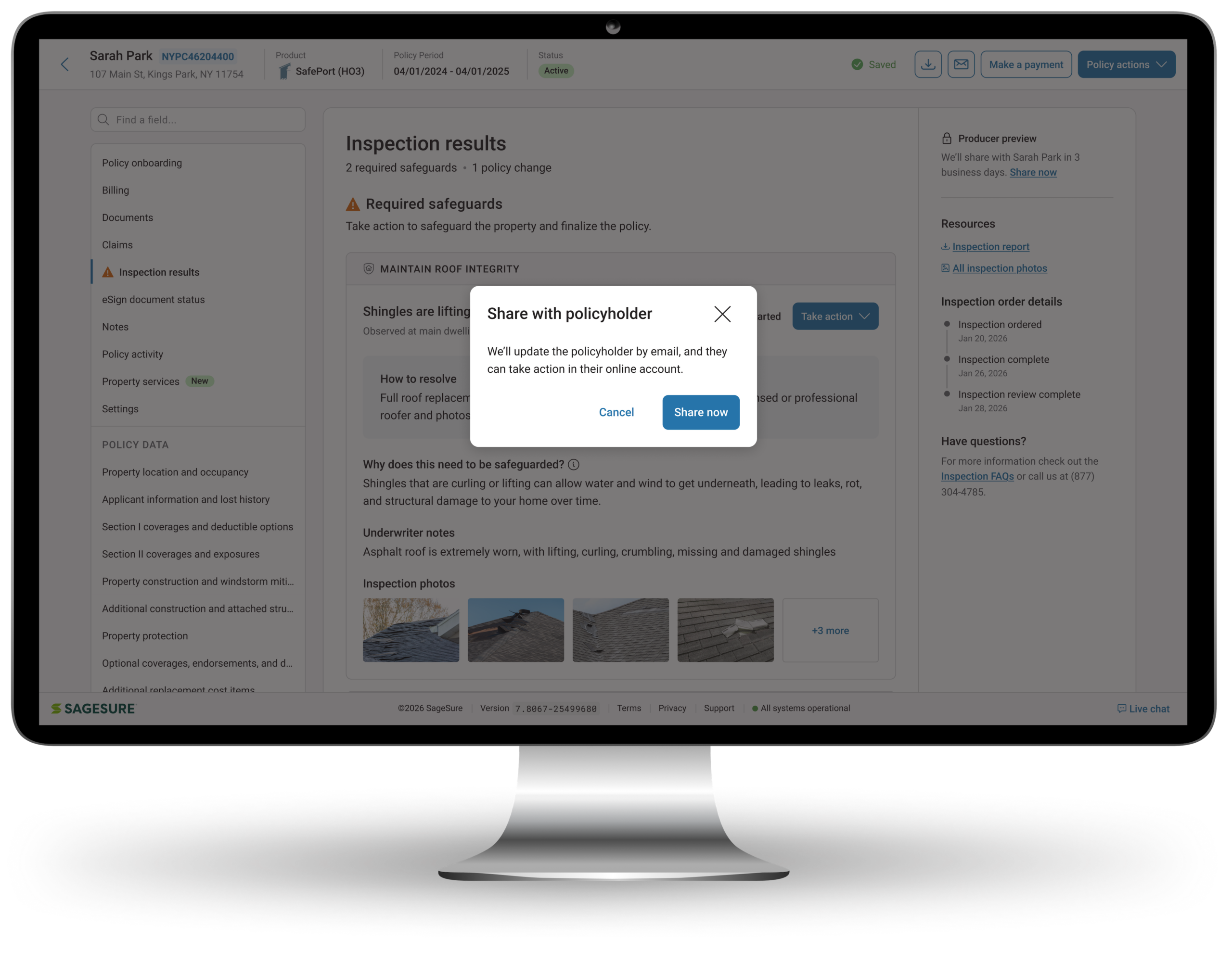
The producer preview window gives you three days to review required safeguards and policy changes, use our new resolution tracks, or plan your client conversation before your client sees the inspection results in their SageSure account. Most of the time, you can handle adjustments without your client’s involvement. You can also immediately release the results with a single click.
Inspection photos are now displayed directly on the required safeguard card for easy review. A unified gallery shows inspection photos and safeguard verification files in a single side-by-side view. With automated, real-time status updates visible on the card—Not Started, Submitted, and Resolved—you can see exactly where the policy stands.
WHAT’S NEW
Our Enhancements in Action
Get a first look at the improvements we’re rolling out.